
The Complete Aspects Of Google Analytics
Have you ever wondered about your websites visitors, where do they come from and what do they do to your website? The only answer comes from Google’s comprehensive website Analytics service that gives you complete statistics of people who have visited your website.

How It Works:
The Google Analytics Tracking code is inserted at the top of the web page in your website, JavaScript is executed each time when those pages are retrieved by someone. Anonymous information about visitors is collected by Google and stores those data on their servers, these data are available virtually to you in Google Analytics Report.

There are 2 ways to verify a Website:
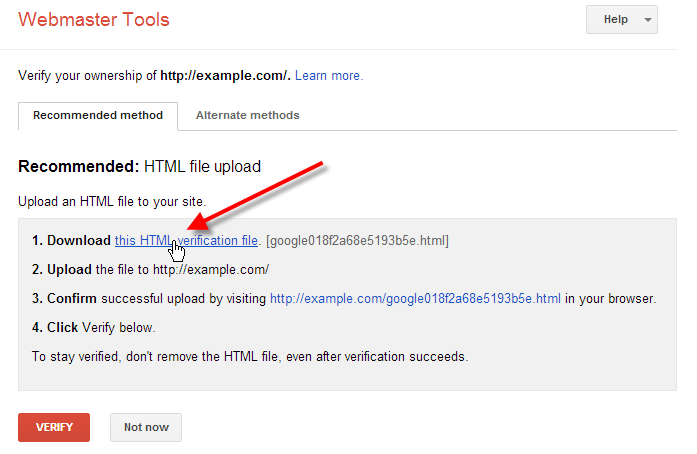
 By Adding Html
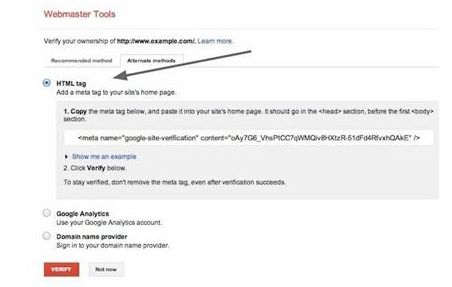
By Adding Meta Tag
If you want to verify your website by adding Html, we suggest you to download the file given to you and store that file in your computer’s desktop.
With the help of your favorite FTP client login to your website or Mysql.
Once the web-browser/remote browser opens open the local browser where you had earlier saved the HTML file.
Just copy the file in the root folder of your website by locating it in local browser.
Go back to Google analytic and simply click the verify button and your website is verified.
 >
>
If you are newbie and you have absolutely knowledge about analytics, you can verify your website by adding Meta tag,
Copy you entire Index file and paste it on a new notepad as Backup.
Copy META TAG.
Open the index.php file and scroll down for the first and paste the Meta tag just below it.
After adding save the file.
Go back to analytic and verify site.
Return on Investment can be improved or increased by using Google Analytics, statistics are not worthy unless they are implemented to your business, the tool allows you to monitor marketing campaigns and track metrics, such as revenue.
Design and adjust your website content accordingly to increase conversions and make more money online with campaigns based on data instead of guesswork.

+ There are no comments
Add yours